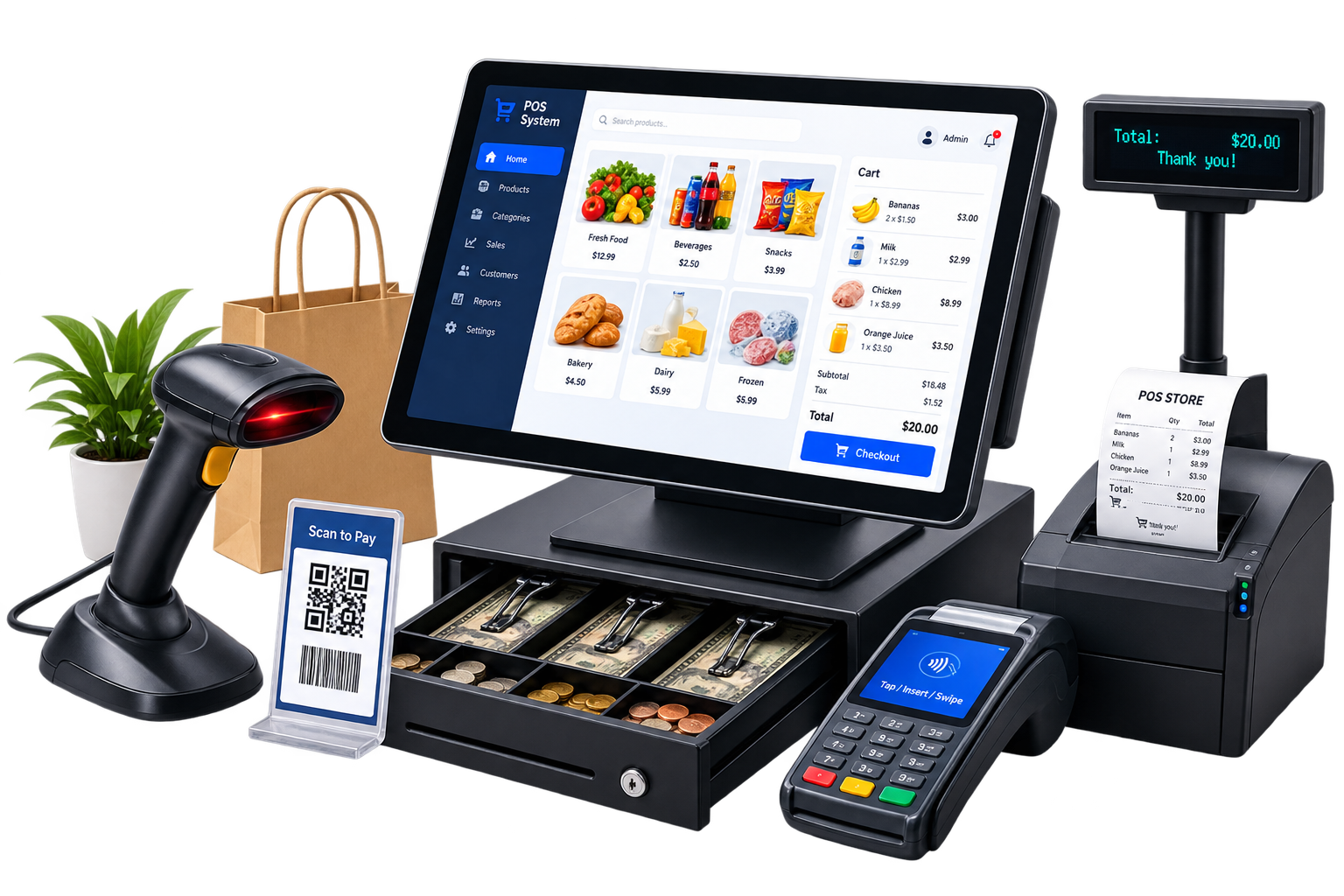
Staff POS interface
Touchscreen cashier flow with fast product search, cart management, discounts, voids, returns, and split payment handling built for speed at the counter.
 OLECTRONI

POS & Kiosk Systems
Hardware and software built for retail, food service, and hospitality teams that trade every day without room for downtime.
What this service is
A POS & kiosk system is hardware, software, and operations in a chain. When any one link fails, it fails at the counter.
Your cashiers need a terminal that responds without hesitation. Your managers need accurate sales and stock data without manual reconciliation at close. Your system needs to handle a full trading day: split payments, voids, returns, multi-location stock, offline resilience, and last-minute menu changes.
Standard packages cover the clean transaction path. When your cafe charges differently for eat-in versus takeaway, or your pharmacy manages two pricing structures in the same queue, or your kiosk menu changes at 4pm on a Friday, the gaps show. Those aren't edge cases. They happen every shift.
We design and deploy POS & kiosk systems for retail shops, cafes, quick-service restaurants, pharmacies, salons, and hotels across UAE, UK, and US markets. One team handles hardware sourcing, software configuration, staff training, and go-live support. You get a checkout system your team trusts and data you can actually use.
What's included
Hardware, software, peripherals, and ongoing support — all scoped to your operation before any equipment is ordered.
Touchscreen cashier flow with fast product search, cart management, discounts, voids, returns, and split payment handling built for speed at the counter.
Customer-facing ordering and checkout with guided menus, upsell prompts, and receipt options — no staff required at the terminal during the transaction.
Card, contactless, mobile pay, and cash reconciliation across counters, connected to your payment processor — not a locked proprietary gateway.
Stock counts update in real time as sales, returns, and purchase orders post. Visible across all locations on one dashboard screen.
End-of-day summaries, product performance, and location-level reports accessible by role — not shared logins with full system access for everyone.
Barcode scanners, receipt printers, cash drawers, customer displays, and kitchen bump screens — specified, sourced, and installed by the same team.
Hardware & software
Hardware
We spec hardware for your environment, not from a single product list. High-traffic counters get different terminals than salon reception desks. Kiosk enclosures are rated for self-service durability. We source from POS-certified suppliers with UAE-local stock, so a replacement printer reaches you the same morning — not in six weeks from a European warehouse.
Software
Software is configured around your actual product catalogue, pricing rules, tax rates, and staff permissions — not set to defaults and handed over. Every discount type, every role restriction, every receipt format is mapped before go-live. When your menu changes at 5pm on a Friday, you make that change yourself. No support ticket needed.
Deployment & support
Five stages from site survey to ongoing care. Each one produces a visible output — not a meeting that leads to another meeting.
We visit your location, map counter positions, cable runs, power outlets, and network infrastructure. Output: a hardware specification document with part numbers, quantities, and a physical installation plan. No surprises on install day.
Terminals, peripherals, and software are set up and tested off-site before anything reaches your shop floor. Payment terminals are certified against your payment processor account. Your product catalogue, pricing rules, and staff roles are loaded and validated against a test transaction set.
Two sessions: one for cashiers covering the daily transaction flow, voids, and payment types; one for managers covering end-of-day close, reports, and product catalogue updates. Both come with a printed quick-reference card your team keeps at the counter.
An engineer on-site or on video call for your first full trading day. Any issue that blocks a transaction is treated as a priority response. We stay until your team is confident and your close-of-day reconciliation runs clean.
Remote health monitoring, software updates pushed outside trading hours, and a named support contact — not a ticket queue. Response SLAs: [METRIC] hours for transaction-blocking issues; [METRIC] hours for non-blocking queries.
Results
Every setup is shaped around the way your team sells, serves, and reports. Here is what that means across different environments.
Multi-location retail
Quick-service restaurant
Hotel & spa operations
Why Solectronix
We hold common POS terminals, receipt printers, and peripheral hardware in-country. When a printer fails on a Saturday morning before your busiest shift, a replacement arrives the same day. Not tracked from Europe. Not conditional on a warranty claim turnaround.
The team that configures your menu and payment rules installs your terminals and trains your staff. When a rollout problem appears, there is one call — not a conference between your software vendor and your hardware reseller while your queue grows longer.
Every terminal queues transactions locally when internet connectivity drops. A router failure during a busy dinner service doesn't halt your tills. Transactions sync automatically when connectivity restores — no manual reconciliation required afterward.
If your pharmacy has two pricing structures, your POS reflects both. If your kiosk menu needs to hide items when kitchen prep falls behind, that logic is built in. Your configuration isn't a workaround applied on top of the system. It is the system.
Who it's for
POS & kiosk systems work hardest in environments where checkout speed, stock accuracy, and end-of-day data matter every trading day. Some of the sectors we work with:
Common questions
Questions about a specific setup? Talk to us directly — we'll give you a straight answer before you commit to anything.
Cost depends on terminal count, peripheral hardware, software scope, integration requirements, and support tier. We provide a fixed-fee quote after a site survey and requirements session — no hourly estimates, no ballpark figures that change at invoice.
A standard single-site retail POS installation takes 3–6 weeks from contract to go-live. Self-service kiosks with custom menus and integrations typically need 8–12 weeks. Multi-site rollouts are phased. Timeline assumes hardware availability and client decisions on schedule.
We connect to common accounting platforms — Xero, QuickBooks, Sage — through direct integrations or structured export formats. We review your current setup during discovery and confirm integration scope before quoting. Custom integrations are scoped separately.
Terminals store transactions locally and process in offline mode. Card authorisation requires connectivity — offline payment requirements are scoped during discovery. When internet restores, transactions sync automatically. The procedure is documented in your staff reference guide.
New locations are added without changes to your existing configuration. Each branch can carry its own product list, pricing rules, and staff permissions while head office sees a consolidated reporting view. Architecture is tested at scale before it affects your live environment.
Data migration is scoped per project. We export your current product catalogue, customer records, and sales history, map fields to the new system, validate against your source data, and import before go-live. You do not start the new system from zero.
POS & Kiosk Systems
Book a 30-minute demo. We'll walk through your checkout flow in a working system, not a slide deck.
Book a demo